
Search engine optimization (SEO) is one of the most important skills for anyone who wants to grow a website, publish a blog, or build an online business. Whether you are a beginner blogger, freelancer, small business owner, or digital marketer, understanding SEO can help you attract more visitors from search engines without paying for every click.
However, SEO can seem complicated when you first start learning. You may hear terms such as keywords, backlinks, on-page SEO, technical SEO, and search intent. The good news is that you do not need to master everything at once.
This guide explains the SEO basics for beginners in simple English. You will learn what SEO is, how it works, how to find keywords, how to optimize your content, and how to measure your progress.
1. What Is SEO?
SEO stands for Search Engine Optimization. It is the process of improving a website and its content to help search engines understand its pages and make them more visible in relevant search results.
For example, imagine you publish an article titled “How to Start Affiliate Marketing.” Someone searches Google for information about starting affiliate marketing. SEO helps you create useful content that may appear in those search results.
SEO does not guarantee the first position on Google. Instead, it helps search engines discover, understand, and evaluate your content.
Why Is SEO Important?
SEO can benefit your website in several ways:
- Organic traffic: Attract visitors from unpaid search results.
- Better visibility: Help people discover your website when searching for relevant topics.
- User experience: Make your content easier to read and navigate.
- Trust and credibility: Provide helpful information that answers visitors’ questions.
- Long-term growth: Well-maintained content can continue attracting visitors over time.
- Business opportunities: Reach people who are interested in your services, products, or expertise.
SEO takes time, and results depend on competition, content quality, website performance, and other factors. It should be treated as a long-term strategy rather than a quick way to get traffic.
2. How Do Search Engines Work?
Search engines generally use three main processes to make web pages available in search results.
Crawling
Crawling is the process of discovering web pages. Search engines use automated programs, often called crawlers or bots, to follow links and find new or updated content.
Indexing
After discovering a page, a search engine may analyze its content, images, and other information. It can then store the information in its index. Not every page that is crawled will necessarily be indexed.
Ranking
When someone enters a search query, the search engine selects and orders results based on many signals. These can include relevance, content quality, usability, location, and the meaning of the query.
For example, if someone searches for “best free keyword research tools,” Google aims to show pages that best answer that particular question.
Your goal is to publish helpful, accessible content that search engines can understand and that people genuinely want to read.
3. Understand the Three Main Types of SEO
SEO is commonly divided into three main areas: on-page SEO, off-page SEO, and technical SEO.
On-Page SEO
On-page SEO involves improving the elements on your web pages. These include titles, headings, content, internal links, image descriptions, and URLs.
For example, an article about keyword research should explain the topic clearly, use a descriptive title, and organize information under relevant headings.
Off-Page SEO
Off-page SEO refers to activities outside your website that can support its reputation and visibility.
Examples include earning relevant backlinks, receiving genuine mentions from other websites, and building relationships within your industry.
A backlink is a link from another website to your website. Links from relevant, trustworthy sources can help search engines discover your content and may support your site’s reputation. However, buying links or creating manipulative link schemes can violate search engine spam policies.
Technical SEO
Technical SEO focuses on making your website easier for search engines to crawl and understand while providing a good experience for visitors.
Important areas include website speed, mobile usability, secure HTTPS connections, XML sitemaps, redirects, and indexing settings.
You do not need to become a developer to begin learning technical SEO. Start with the basic issues that prevent visitors or search engines from accessing your content.
4. Keyword Research: Find What People Search For
Keyword research is the process of discovering the words and phrases people use when searching online.
Choosing relevant keywords helps you understand your audience and create content that matches their needs.
For example, if your website covers digital skills, possible keywords include:
- SEO basics for beginners
- How to use Google Search Console
- Best free keyword research tools
- Affiliate marketing for beginners
- How to improve website traffic
How to Find Keywords
Step 1: Choose a topic. Start with a subject related to your website, such as SEO, freelancing, or digital marketing.
Step 2: Brainstorm search queries. Think about the questions a beginner might ask about that topic.
Step 3: Use keyword research tools. Google Keyword Planner, Google Trends, and other keyword research platforms can help you explore search terms and related topics. Available data and features vary by tool.
Step 4: Study search results. Search for your chosen phrase and examine the types of pages that appear. Look at whether users seem to want a tutorial, comparison, definition, or product recommendation.
Step 5: Choose a suitable keyword. Consider relevance, search intent, competition, and your ability to produce a genuinely useful page. Do not select keywords based on search volume alone.
What Is Search Intent?
Search intent is the reason behind a search query.
Common types include:
- Informational: The user wants to learn something, such as “what is SEO?”
- Navigational: The user wants to find a particular website, such as “Google Search Console.”
- Commercial investigation: The user is comparing options, such as “best SEO tools for beginners.”
- Transactional: The user is ready to take an action, such as purchasing a service.
Understanding search intent helps you create the right kind of content for your target audience.
5. On-Page SEO: Optimize Your Content
On-page SEO helps search engines and readers understand what your page is about.
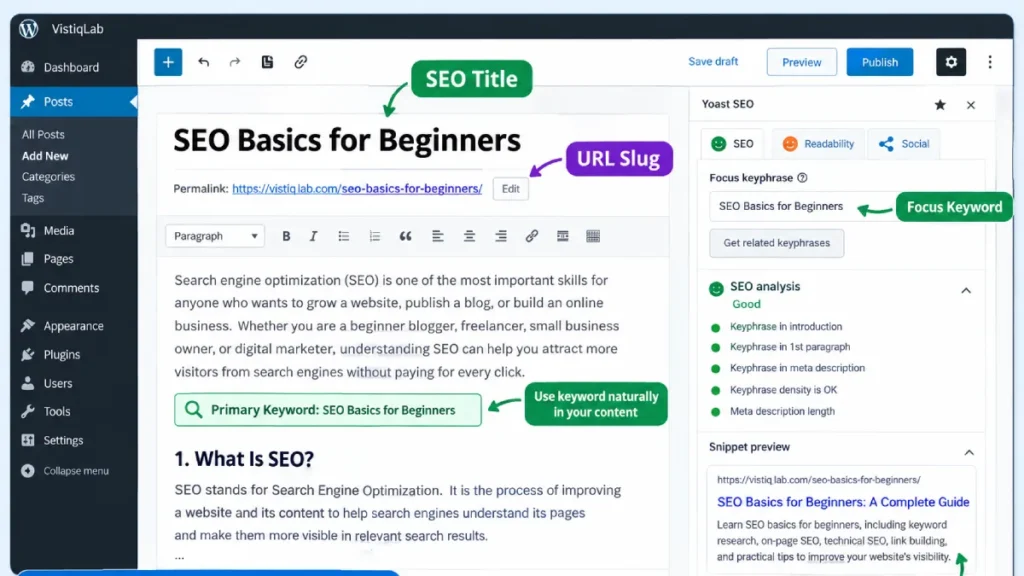
Write a Clear SEO Title
Your SEO title should describe the page accurately and give readers a reason to click. Include your primary keyword naturally when it fits.
Example: “SEO Basics for Beginners: A Complete Guide.”
Avoid misleading titles or repeating the same keyword unnecessarily.
Use Headings Correctly
Organize your article with a clear heading structure. Use an H1 for the main page title, H2 headings for major sections, and H3 headings for relevant subsections.
Headings should make the content easier to scan rather than simply provide places to insert keywords.
Create Helpful, Original Content
Your content should answer the reader’s question clearly and provide enough detail to be useful.
To improve your articles:
- Explain difficult ideas in simple language.
- Use practical examples.
- Break long sections into shorter paragraphs.
- Add relevant images or screenshots when they clarify a process.
- Check facts and update outdated information.
- Review spelling, grammar, and readability before publishing.
Avoid copying content from other websites or publishing many low-value pages just to target different keywords.
Optimize Your URL
A short, descriptive URL helps users understand what a page covers.
Example: example.com/seo-basics-for-beginners/
Avoid unnecessary numbers, confusing parameters, and long strings of unrelated words where possible.
Optimize Images
Use relevant images that improve understanding. Give image files descriptive names and add meaningful alt text when appropriate.
For example, an image showing a keyword research process could use the filename keyword-research-guide.png.
Alt text should describe the important information conveyed by the image. Do not stuff it with keywords. Compress images when needed to help pages load efficiently.
Add Internal Links
Internal links connect one page of your website to another.
For example, an article about SEO basics could link to your detailed guide on keyword research. This helps readers discover related information and helps search engines find other pages on your website.
Use descriptive anchor text so readers understand what they will find after clicking.
6. Technical SEO Basics for Beginners
A useful article can still struggle to reach its audience if search engines cannot access it or visitors have difficulty using the website.
Start by checking these important technical SEO elements.
Mobile-Friendly Design
Many people browse the internet on mobile devices. Your website should display text, images, menus, and buttons properly on smaller screens.
Choose a responsive WordPress theme and test important pages on different screen sizes.
Website Speed
Slow pages can frustrate visitors. Improve loading performance by compressing images, using reliable hosting, limiting unnecessary plugins, and choosing efficient themes.
Avoid installing multiple plugins that perform the same task.
HTTPS Security
HTTPS helps protect information transferred between a visitor’s browser and your website. Make sure your website uses a valid SSL/TLS certificate and redirects visitors to the secure version of your site when configured appropriately.
XML Sitemap
An XML sitemap lists important URLs on your website that you want search engines to discover. Many WordPress SEO plugins can generate a sitemap automatically.
You can submit your sitemap through Google Search Console. Remember that submitting a sitemap does not guarantee that every URL will be indexed.
Robots.txt and Indexing
Robots.txt provides crawling instructions to search engine bots. It is different from a noindex directive, which can tell search engines not to include a page in their search results.
Check your settings carefully. Accidentally blocking important pages or marking them noindex can interfere with search visibility.
7. Off-Page SEO and Building Backlinks
Backlinks are links from external websites that point to your pages. They can help search engines discover content and may serve as signals of a page’s reputation.
However, not all backlinks are equally valuable. A relevant, editorially earned link can be more useful than many unrelated links created solely to manipulate rankings.
Beginner-Friendly Ways to Earn Backlinks
Publish useful resources. Create tutorials, original research, checklists, or practical guides that other websites may want to reference.
Write guest articles selectively. Contribute original, relevant content to reputable websites when the arrangement benefits readers.
Build professional relationships. Connect with bloggers, educators, businesses, and professionals in your niche.
Participate in communities. Answer questions on relevant platforms and share useful resources when they genuinely help the discussion.
Promote your content. Share articles through appropriate social media channels, newsletters, and professional communities.
Avoid buying links intended to manipulate rankings, automated link-building schemes, and excessive reciprocal linking. Focus on usefulness and genuine relevance.
8. Essential SEO Tools for Beginners
You can start learning SEO without purchasing expensive software. Several tools offer useful information at no cost.
Google Search Console
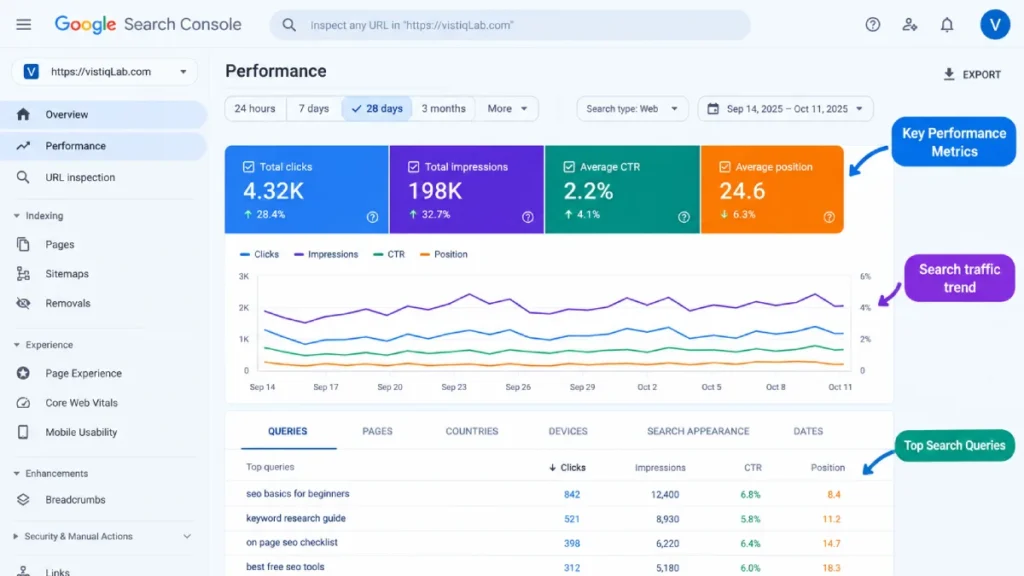
Google Search Console helps website owners understand how their sites perform in Google Search. It provides information about search queries, clicks, impressions, indexing, and certain technical issues.
Use it to identify pages receiving search traffic and investigate potential indexing problems.
Google Analytics
Google Analytics can help you understand how people interact with your website, including traffic sources, engagement, and important actions.
It complements Search Console, but it does not replace it. The two tools measure different aspects of website performance.
Google Keyword Planner
Keyword Planner helps users discover keyword ideas and review search-related estimates. Some data and features depend on account settings and advertising context.
Google Trends
Google Trends helps you explore how interest in a topic changes over time and compare related search terms.
SEO Plugins for WordPress
WordPress SEO plugins can help manage title tags, meta descriptions, XML sitemaps, and other optimization settings. Choose a plugin that suits your needs and avoid installing multiple plugins for identical functions.
9. How to Measure SEO Performance
SEO is not only about publishing articles. You should also monitor performance to understand what is working and where improvements may be needed.
Track these important metrics:
- Clicks: How many times people clicked your website in search results.
- Impressions: How often your pages appeared in Google Search results.
- Click-through rate (CTR): The percentage of impressions that resulted in clicks.
- Average position: A summary of your site’s average ranking position for selected search activity.
- Organic traffic: Visits attributed to unpaid search results in your analytics reports.
- Conversions: Meaningful actions, such as newsletter sign-ups, enquiries, or purchases.
You can use Google Search Console and Google Analytics to monitor many of these metrics.
Do not judge success by a single day’s results. Search performance changes, and some keywords may take considerable time to gain visibility.
Review your data regularly, compare similar periods, and focus on changes that help users.
10. Common SEO Mistakes Beginners Should Avoid
Learning what not to do is just as important as understanding SEO best practices.
Keyword stuffing: Repeating keywords unnaturally can make content difficult to read and may violate spam policies.
Copying content: Publishing copied articles offers little unique value and can create copyright and quality problems.
Ignoring search intent: A page may target the right phrase but fail to answer what people actually want to know.
Neglecting mobile users: A difficult mobile experience can discourage visitors from exploring your website.
Buying manipulative backlinks: Artificial link schemes can put your website at risk of search spam actions.
Expecting instant results: SEO takes time. There is no guaranteed ranking timeline.
Publishing without proofreading: Errors, unclear explanations, and broken links can reduce the usefulness of your content.
Ignoring updates: Review older articles when facts, tools, screenshots, or recommendations change.
11. A Simple 30-Day SEO Plan for Beginners
You can begin learning SEO with a manageable plan rather than trying to optimize everything at once.
Week 1: Build the Foundation
Learn the basics of crawling, indexing, ranking, and search intent. Set up Google Search Console and review your website’s important pages.
Week 2: Research Keywords
Choose a few relevant topics for your audience. Research keyword ideas and identify the questions your articles should answer.
Week 3: Publish and Optimize Content
Write useful articles, organize headings, improve titles and URLs, add relevant images, and connect related pages with internal links.
Week 4: Review and Improve
Check Search Console for indexing issues and early performance data. Fix broken links, review mobile usability, and identify articles that could be clearer or more helpful.
After the first 30 days, continue publishing quality content and reviewing your results. Treat this plan as a starting point, not a promise of specific rankings or traffic.
Conclusion
SEO basics for beginners are easier to understand when you learn one step at a time. Start by understanding how search engines work, researching relevant keywords, publishing helpful content, and improving your website’s structure and performance.
Next, learn how to use tools such as Google Search Console and Google Analytics to monitor results. Build backlinks naturally by creating resources worth sharing, and avoid shortcuts that promise guaranteed rankings.
Most importantly, focus on helping your readers. Search engine optimization is not just about adding keywords to a page; it is about making useful information easier to discover and understand.
With consistent effort, regular improvements, and patience, you can build a stronger foundation for your website’s long-term search visibility.
Frequently Asked Questions (FAQs)
1. What is SEO in simple words?
SEO is the process of improving a website so search engines can understand its content and people can discover relevant pages through unpaid search results.
2. Can beginners learn SEO for free?
Yes. Beginners can learn SEO using free educational resources and tools such as Google Search Console, Google Trends, and Google Analytics.
3. How long does SEO take to show results?
There is no fixed timeline. Results depend on factors such as competition, website history, content quality, and technical accessibility. Meaningful improvements can take months or longer.
4. Is SEO necessary for a WordPress website?
SEO is not mandatory for running a WordPress website, but it can help search engines discover your content and help interested readers find your pages.
5. What is the most important SEO factor for beginners?
Start with useful, relevant content that satisfies search intent. Combine it with clear page structure, accessible technical settings, and a good user experience rather than focusing on one ranking factor alone.

Pingback: Keyword Research Guide. Find the Right Keywords for SEO